Reeldo AIReeldo AI

Wan 3.0 AI Video Generator

Flexible 2–30 second clips — text, image, references, documents, or URLs. Standard for drafts, Prime for higher-fidelity finals. Optional synchronized audio.

  • 2–30s in one generation
  • PDF / URL → video
  • Image1 · Video1 · Audio1

Reeldo is not the official Alibaba Wan website.

Create a Wan 3.0 clip

Credits scale with seconds and resolution. Turn Sound off for motion-only proofs. Use Wan Reference, File, or Link tabs when you have refs or a deck.

See Wan examples below

Model

0/5000
9:16 · 15s · Example 1

Wan 3.0 example prompts

Copy a prompt or click Use in generator — settings match each job below.

Example 01 / 04

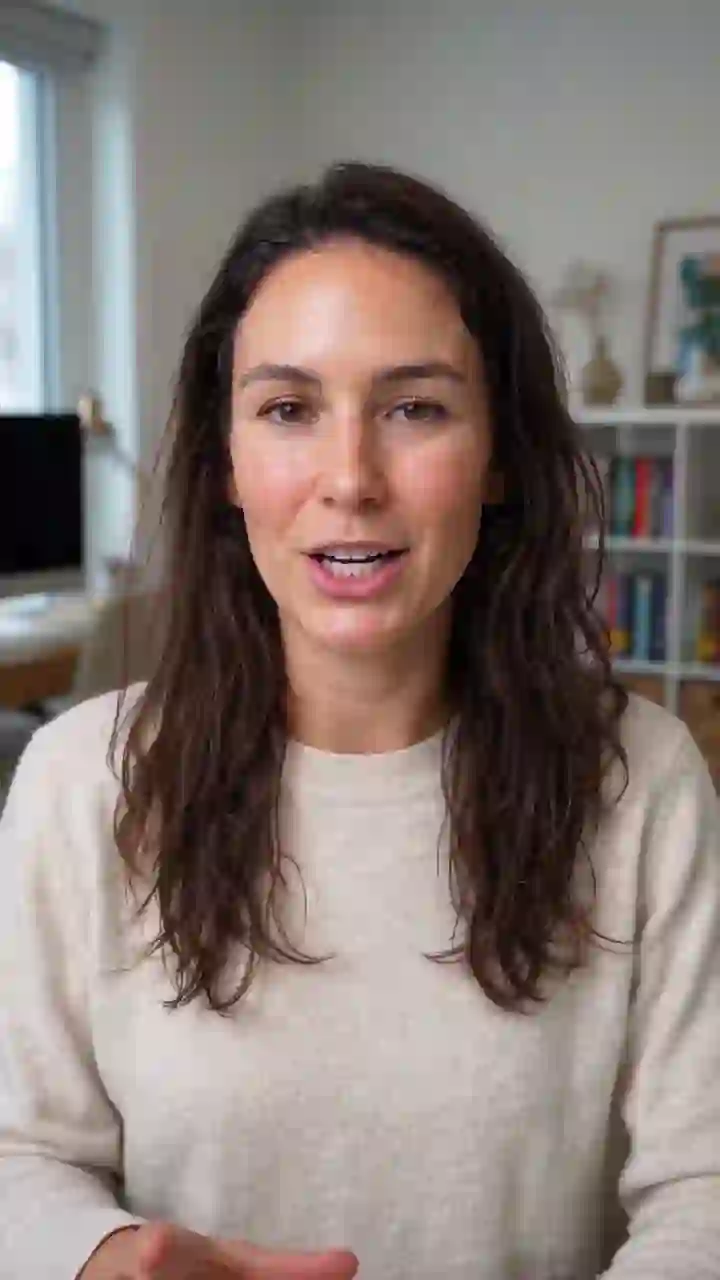
T2V · Standard · 15s

Recorded run — prompt and settings match this output.

One vertical take with room to breathe

Scenario
Meta or TikTok hook longer than Veo 8s — one continuous shot, not a hard-cut montage.
Result
15 seconds in a single 9:16 export with stable framing.
Settings

Prompt template

Vertical 9:16, one continuous 15-second take, shallow depth of field, subtle handheld UGC feel. Medium close-up at eye level: woman late 20s, cream knit sweater, soft window light from camera-left. She speaks to camera with natural hand gestures — single shot, no cuts, no on-screen text. Native audio: clear voice forward, quiet home-office room tone, no music. Stable face throughout the full 15 seconds.

Example 02 / 04

File · Standard · 20s

Concept visual — mode and settings match Reeldo; upload your file or refs in the generator.

Concept visual for Wan File — PDF to 20 second video with timeline and filmstrip UI

PDF in → one teaser out

Scenario
You have a one-pager or deck — you should not manually storyboard every beat.
Result
One 20s 16:9 clip parsed from your file with a clear three-beat flow.
Settings

Prompt template

From the uploaded document, create one 20-second 16:9 product teaser. Focus on three beats only: problem, solution, proof — skip boilerplate and legal footer text. Clean modern SaaS ad look, subtle UI motion, no fake logos, no unreadable tiny on-screen text. One continuous flow, not slide-by-slide hard cuts. Optional native audio: calm professional voiceover tone, light ambient bed, no loud music.

Example 03 / 04

Ref · Image1 + Video1 · 8s

Concept visual — mode and settings match Reeldo; upload your file or refs in the generator.

Concept visual for Wan Reference — Image1 and Video1 keyframe rail with 8 second player

Your identity, their camera move

Scenario
You have a motion reference clip but need a different face or wardrobe.
Result
Image1 locks who appears; Video1 locks push-in and handheld pacing.
Settings

Prompt template

Using Image1 for the woman's face, hair, and olive green bomber jacket, and Video1 for camera path, pacing, and handheld feel: Vertical 9:16, one continuous 8-second take. Match Video1 motion exactly — do not copy Video1 background or clothing. Image1 identity stable throughout. No on-screen text.

Example 04 / 04

Start → End · Prime · 8s

Concept visual — mode and settings match Reeldo; upload your file or refs in the generator.

Concept visual for Wan Prime start and end frames — keyframe timeline with 8 second player

Two stills, one smooth transition

Scenario
Marketing approved closed and open packshots — you need motion between them.
Result
Prime interpolates from start frame to end frame in one 8s 1080p move.
Settings

Prompt template

16:9 cinematic transition from the closed jar start frame to the open jar end frame. One smooth 8-second continuous move: lid release between frames — same jar silhouette and frost glass texture, cream revealed inside. No new packaging graphics, no on-screen text. Premium beauty lighting, photoreal materials.

Wan 3.0 credits and pricing

A Credits ≈ output seconds × rate @ resolution — Standard and Prime use different Kie per-second rates.

B Wan Reference: billed seconds = output duration + total reference video duration (reference images do not add seconds). Pick output seconds explicitly in the generator.

Toggle Sound off when you only need motion — saves credits vs sound-on runs on other models.

Start here — 5s Standard proof

Standard @ 720p · from $0.52

22 credits

Sound off · motion and framing check before 15s social.

15s social @ 720p

Standard @ 720p · from $1.57

66 credits

Typical sound-on vertical hook.

8s Wan Reference @ 720p (Example 3)

Standard @ 720p · from $1.69

71 credits

Image1 + Video1 · 8s output + 8s reference video · Sound off.

15s Wan Reference @ 720p

Standard @ 720p · from $3.16

133 credits

Trend-style motion swap · 15s output + 15s Video1 · Sound on.

20s File teaser @ 720p

Standard @ 720p · from $2.12

89 credits

Sound on · PDF/PPT parsed in Wan File tab.

15s Prime @ 1080p final

Prime @ 1080p · from $3.95

166 credits

Only after Standard proof looks right.

Wan Standard vs Prime

Wan Standard vs Prime
FeatureStandardPrime
Resolution options480p / 720p / 1080p480p / 720p / 1080p
BillingLower Kie $/s @ 720pHigher Kie $/s @ same resolution
15s T2V (no refs)66 credits · Standard · 720p · Sound on166 credits · Prime · 1080p · Sound on
8s Reference (8s Video1)71 credits · Standard · 720pPrime uses the same output+ref formula at a higher $/s
Output characterFaster iterationHigher-fidelity finals
Best forDrafts & social proofsApproved hero exports

Yearly plans lower your cost per clip on Reeldo

Yearly billing grants 12× monthly credits at about 10× the monthly price (~2 months free). On Max, yearly is about $0.024/credit vs $0.029 on monthly (~17% lower per credit). One-time packs (Popular) run about $0.045/credit — ~48% higher than Max yearly. ~USD below uses Max yearly; monthly subs or packs increase the dollar amount.

See plans and credit packs →

Standard vs Prime @ common resolutions

480p drafts · Fastest credit burn for motion tests
720p social · Default proof tier
1080p Prime · Higher-fidelity finals — higher credits per second than Standard
Sound toggle · Off for motion-only · On for ambience or dialogue

Max clip length is 30 seconds per generation. With reference video, input + output cannot exceed 30s — see Video Extend for continuation.

~USD uses Max yearly $/credit. Your Generate button shows exact credits before you run.

Troubleshoot Wan 3.0 clips

Change one thing per retry — prompt, seconds, or Sound — not all three.

Packaging or logo morphs

Text-only prompt with no start frame, or motion verbs too aggressive.

Switch to image to video with the packshot as start frame. Shorten to 5–8s and reduce camera verbs.

Face changes mid-clip

Long takes without Image1 lock, or conflicting style words.

Add Image1 in Wan Reference, shorten duration, or rerun on Prime after a Standard proof.

Credits feel high for silent B-roll

Sound left on while iterating motion-only prompts.

Turn Sound off until dialogue or ambience is final — then enable for one sound-on export.

Cannot add more seconds

30s total cap — especially with Video1 reference length.

Pick fewer reference seconds or chain Wan continuation from Studio (input + output ≤ 30s).

Pattern — Image1 + Video1

Using Image1 for [subject] and Video1 for camera motion:
One continuous take, match Video1 pacing, keep Image1 identity stable.

Pattern — optional audio

Native audio: soft room tone, no music.
Or: motion-only — disable Sound in the generator for proofs.
Three habits that stop a wasted rerun
  1. 1. 5s Standard before 15–30s

    Lock composition at 720p with Sound off — then scale seconds and enable Prime.

  2. 2. One prompt line per retry

    Change motion, lighting, or audio — not tier and duration together.

  3. 3. Plan the 30s budget

    Reference video seconds subtract from max output — calculate before you generate.

After export: extend, rerun, or upscale

Branch 1

Motion works — you need more seconds on the same Wan take

Wan continuation from Studio → Video Extend

Not Veo-style native merge — Video1 reference path; total ≤ 30s.

Branch 2

Wrong subject or scene from frame one

New 5s Standard proof with tighter prompt

Extend will not fix a bad opening.

Branch 3

Motion approved — you need sharper delivery pixels

Video Upscale or rerun at 1080p Prime

Wan has no 4K tier — use Kling 4K or upscale for UHD.

Before you chain another step

  1. QC product and faces

    Especially labels, hands, and last-frame composition before extend.

  2. Open Video Studio

    Extend clip → routes Wan continuation when source was Wan.

  3. Video Extend guide

    Wan vs Veo native extend router.

Wan 3.0 FAQ

What is Wan 3.0?

Wan Standard vs Prime?

How long can Wan clips be?

How are Wan credits calculated?

Does Wan support optional audio?

Does Wan support start and end frames?

How does Wan Reference work?

Can Wan read PDFs or webpages?

How do I extend a Wan clip?

Wan 3.0 vs Veo 3.1?

Wan vs Kling 3.0?

Wan vs Seedance 2.5?

Is Reeldo the official Wan website?

Reeldo is not the official Alibaba Wan website.