
Not Frozen / Elsa
Searching ice queen on TikTok also shows Elsa cosplay and makeup. This November 2026 trend is a CapCut AI poster template — no live filter.
Nov 2026 rising trend · 1 photo · ~15s · 9:16 · winter triple portrait
Upload one clear portrait and get the snowy triple-poster clip everyone is posting — sky face, fur coat, village walk, falling snow, and music timed to the trend. Browser generator; credits show before Create.
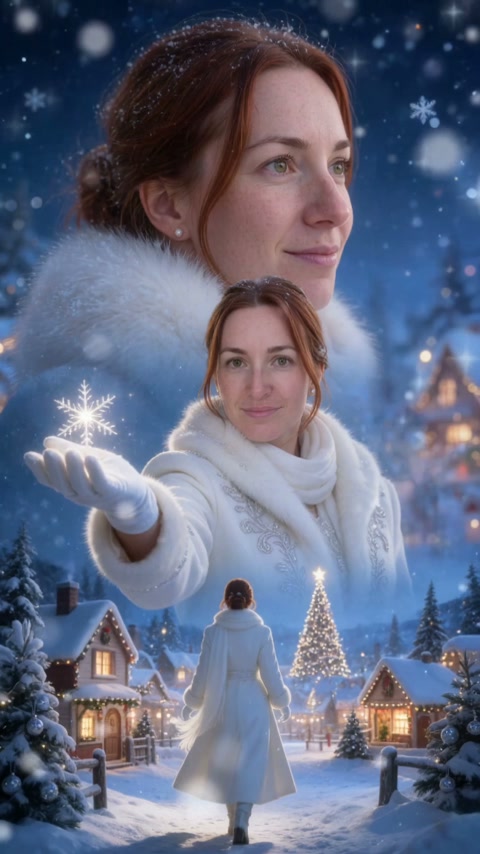
Christmas Ice Queen AI turns one portrait into a vertical snowy Christmas poster video with the same person three times — profile in the night sky, white fur-collared coat with a glowing snowflake, and a small figure walking toward a lit village — from the November 2026 CapCut snow trend. Full template generation from your photo on Wan Reference. Not the Frozen Elsa filter or a makeup effect. Fan-made — not CapCut, TikTok, or rdziy.
Output format
Christmas Ice Queen AI · ~15s · 9:16 · winter triple portrait · sound on
Quality
One person — face forward, chest up, even light, only you in frame.
~USD uses Max yearly $/credit (best subscription rate). Monthly plans or one-time credit packs cost more per clip.
Christmas Ice Queen AI example
Sample export from one portrait on this page — triple snowy poster with sound.
Viral templates trending on TikTok and Reels — same one-click formats as AI Effects. Pick another in seconds.
In November 2026 the CapCut template snow trend by rdziy exploded on TikTok as Christmas Ice Queen — one photo becomes a layered snowy poster: you in the sky, you in a white fur coat holding a glowing snowflake, and a tiny you walking into a lit Christmas village while snow falls. Spanish posts call it reina de hielo navideña; English searchers say Christmas Queen ai or ice queen filter — it is a template, not a live camera filter.
 1
Your face fills the upper night sky — hair dusted with snow — the signature double-exposure look.
 2
Half-body toward camera in a long white coat, gloved hand out, glowing six-point snowflake above your palm.
 3
A small full-length you walks away down a snowy path into cottages with warm windows and a glowing tree.
 4
Snowflakes drift the whole clip — the sparkle and walk timing match the Wan reference and the example export on this page.
Searching ice queen on TikTok also shows Elsa cosplay and makeup. This November 2026 trend is a CapCut AI poster template — no live filter.
Christmas ice queen makeup tutorials are a different category. Here you upload one portrait for a full snowy composite video.
CapCut’s snow trend needs the app and a working Try this template link. Reeldo runs in the browser — one photo, template generation on Wan Reference, credits upfront.
Left: Wan @Video1 motion reference (red-bun snow trend layout). Right: a real Christmas Ice Queen AI export on Reeldo — one portrait from this page, template generation with sound.
Sky profile, fur coat, snowflake, village walk, and music — pacing for Wan @Video1.
Finished Reeldo export from the Good upload portrait — same person in sky, fur coat, and village walk. Template generation, not face-swap.
Upload one photo, create, download — same flow as the generator above. No CapCut template hunt.
One person, face forward, chest up, even light — no hats or group shots.
Pick Draft or Standard. About 15 seconds, vertical 9:16, with the reference music box melody. Credits show before Create.
Save the MP4, turn on the platform AI label, and post with #christmasicequeen or #reinadehielonavideña.
Your face appears twice large on screen — chest-up clarity matters more than outfit or background.

Same ~15-second triple portrait — resolution is the only difference.
Fast test before you post.
About 125 credits (~15s video with sound).
Sharper face in the sky and coat layers for HD feeds.
About 282 credits (~15s video with sound).
Both chase the same November 2026 poster — pick by device and whether you want template generation in the browser.
Open Try this template on TikTok, add one photo in CapCut, export ~17s with mazsullivan audio. Links break; paid steps vary by region.
One-photo Wan Reference template generation — hosted motion reference, ~15s vertical MP4 with music, credits before Create. Not face-swap.
Download, label AI, and match the sound your audience expects.