
Not only the work lip-sync meme
Many posts use the sound for a “why you always at work?” joke with no AI. This page makes the hanging-mic performance clip.
Nov 2026 rising trend · 1 photo · 15s · 9:16 · explicit lyrics
Upload one clear photo and get the Give It All hanging-mic clip people are posting — lobby, crowd, and hook energy in one vertical video with sound. No template hunt and nothing to write.
BigXthaPlug Give It All AI is the November 2026 TikTok trend where you upload one photo and appear at the vintage hanging microphone in BigXthaPlug’s From The Block performance of “Give It All” — packed cinema lobby, crowd behind you, about 15 seconds with the song on the export. Fan-made tool — not BigXthaPlug, his label, From The Block, or CapCut.
Output format
Give It All AI · 15s · 9:16 vertical · sound on · explicit lyrics
Quality
One portrait — face forward, waist-up, even light, only you in frame.
~USD uses Max yearly $/credit (best subscription rate). Monthly plans or one-time credit packs cost more per clip.
Example output
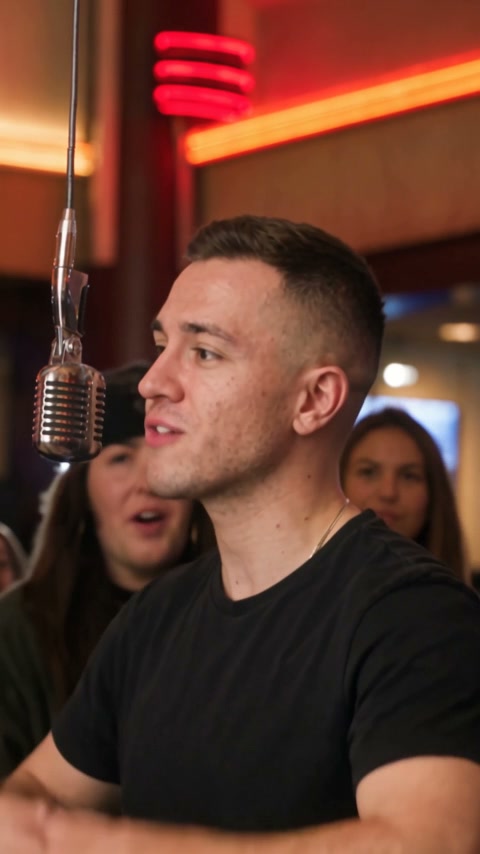
Sample clip from a clear portrait — same lobby and mic timing as the trend.
Viral templates trending on TikTok and Reels — same one-click formats as AI Effects. Pick another in seconds.
In early November 2026, BigXthaPlug’s From The Block performance of “Give It All” blew up on TikTok — one rapper at a silver mic on a long cable, orange showtime boards, fans packed in behind. Within days, creators started posting versions starring themselves at that same mic. That second wave is what people mean by BigXthaPlug AI and Give It All to Me AI.
 1
Night-time movie-theater foyer with orange marquees — the backdrop everyone recognizes from the viral clip.
 2
Silver mic on a cable at mouth height — the signature From The Block look.
 3
Fans shoulder to shoulder behind you — energy matters as much as the rap.
 4
Grin, lean into the mic, clap on the hook — the moves TikTok copies from the performance.
Many posts use the sound for a “why you always at work?” joke with no AI. This page makes the hanging-mic performance clip.
BigXthaPlug also used AI marketing tools on an earlier single. Give It All AI refers to this From The Block mic video only.
Tutorials often link a CapCut template from TikTok. Reeldo runs in the browser — one photo, credits upfront, download MP4 with sound.
Left: the Give It All timing reference your clip follows. Right: a sample result made from one portrait on this page.
Lobby, hanging mic, crowd, and hook beats — the pacing your video matches when you press Create.
Sample output from a clear waist-up portrait — same trend, starring you at the mic.
Three steps — upload, create, post. Same flow as the generator on this page.
One clear portrait — face forward, waist-up if you have it, only you in the frame.
Pick Draft or Standard. About 15 seconds, vertical, with the performance audio. Credits show before Create.
Save the MP4, turn on the platform AI label, and post with #giveitall or #bigxthaplug. Lyrics are explicit — mute in-app if your audience needs clean audio.
Two of the three camera angles stay close on the rapper — a sharp face wins over a busy background.

Same 15-second clip — resolution is the only difference.
Fast test before you post.
About 125 credits (~15s video with sound).
Sharper face and crowd for HD feeds.
About 282 credits (~15s video with sound).
Both chase the same November 2026 meme — pick by device and workflow.
Find a TikTok post with “Use this template,” add one photo in the app, export. Links break; blurry photos fail.
One-photo generator in the browser — credits before Create, vertical MP4 with performance audio. Works on phone or desktop.
Download, label AI, and mind the lyrics.