
The Smiths band vs this AI trend
Many searches for “I love the Smiths” mean the Manchester band. This page is the November 2026 elevator AI video generator — two photos, hosted Video1, Wan template — not band news or tour dates.
November 2026 search spike · 2 photos · 15s · 16:9 · with sound
Upload Photo 1 (listener) and Photo 2 (speaker). Wan recreates the hosted @coenai-style elevator clip shot for shot with reference sound — template generation, not a face swap. Draft or Standard; credits show before Create.
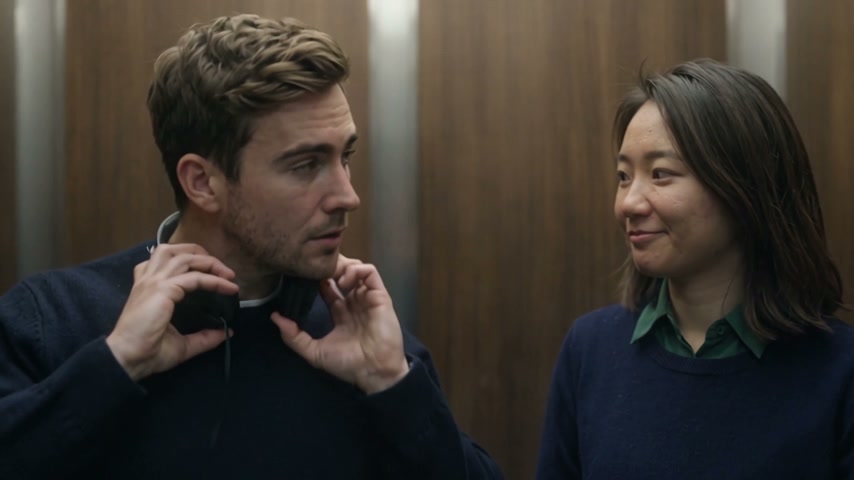
I Love The Smiths AI is a November 2026 TikTok template trend: upload two photos and Wan Reference rebuilds the wood-paneled elevator scene from the (500) Days of Summer meet-cute — one person in headphones, the other says “I love the Smiths” twice — with the hosted Video1 dialogue and timing. Reeldo runs template generation from your uploads, not a face-swap that keeps the original actors on screen. Fan-made only — not The Smiths band, Searchlight Pictures, or the film studio.
Hosted elevator clip
Wan copies this 15s Video1 shot for shot — wood-paneled elevator, headphones, and “I love the Smiths” timing with sound. Your two photos rebuild both performers via template generation, not a face-swap filter.
Your two photos
Photo 1 · listener (left)
Looks ahead in headphones — misses the first line and stays stunned at the end.
Photo 2 · says the line (right)
Turns, smiles, says “I love the Smiths” twice, then walks out.
Quality
Photo 1 = left listener in headphones (stays in the elevator). Photo 2 = right speaker who says the line twice and exits. Use Swap if your roles should flip.
~USD uses Max yearly $/credit (best subscription rate). Monthly plans or one-time credit packs cost more per clip.
Generated example
Real Reeldo output from two photos on this page — upload yours to match the elevator beats.
Viral templates trending on TikTok and Reels — same one-click formats as AI Effects. Pick another in seconds.
The line “I love the Smiths” comes from (500) Days of Summer (2009): Tom listens in the office elevator; Summer hears The Smiths through his headphones and says the line twice before walking out. TikTok has used the scene as a music-taste meet-cute for years — Searchlight reposted it in February 2024. In early November 2026, @coenai’s AI elevator clip went viral and searches for I Love The Smiths AI and I Love The Smiths ai video generator spiked together as template sites launched two-photo generators. Reeldo hosts that motion as Video1 and runs Wan template generation from two photos — not a face-swap overlay on the film cast.
 1
Two people in a tight elevator frame — the listener fiddles with headphones while the other glances at the leaking music.
 2
The listener pulls headphones to the neck and finally turns — the beat where weak uploads break.
 3
Photo 2 smiles, says “I love the Smiths,” and says it again louder when the first landing misses.
 4
Speaker exits; listener freezes as the doors close — the punchline for crush and coworker memes.
Many searches for “I love the Smiths” mean the Manchester band. This page is the November 2026 elevator AI video generator — two photos, hosted Video1, Wan template — not band news or tour dates.
CapCut templates overlay the sound on footage you already filmed in a real elevator. Reeldo generates the whole wood-paneled scene from a hosted reference plus your two uploads in the browser.
Reeldo rebuilds the clip from Video1 with both performers coming from your photos. It is not a face-swap that keeps Tom, Summer, or @coenai’s cast on screen.
Preview what Wan follows before you Create, then watch a finished Reeldo export from the page’s two photo examples — same beats, with dialogue.
The elevator template with sound — motion and dialogue timing Wan copies when you hit Create.
Finished Wan output from Photo 1 (listener) and Photo 2 (speaker) on this page — headphones, double line, stunned stare.
Two photos, one hosted Video1 clip, no prompt.
The hosted 15s clip copies the viral timing — wood elevator, headphones, double line, stunned stare — with sound already on the reference.
One adult per photo, chest up, even light. Photo 1 is the left listener; Photo 2 says the line. Draft or Standard — credits show on the button before anything runs.
Landscape MP4 with dialogue. Crop to 9:16 in TikTok if you want vertical, tag your co-star, and turn on the platform AI label.
Two separate files — never one group shot. Chest-up, face forward, different outfit colors help tell the roles apart.


Both use Wan 3.0 at 16:9 with the hosted elevator Video1 (~15s) including reference dialogue audio.
Cheaper test that both faces hold through the line and exit beat.
15s: ~125 credits @480p · with sound
Sharper faces before you post — default for landscape exports.
15s: ~282 credits @720p · with sound
Competitors market two-photo elevator swaps. This page is Reeldo’s Wan Reference flow with a fixed hosted clip and template-generation prompts.
Film in a real elevator or hunt a filter — you still act the beats and sync the TikTok sound yourself.
Two photos → Wan rebuilds Video1 shot for shot with dialogue on the reference track. Credits before Create.
Preview with sound, then: