
No official CapCut / TikTok filter
As of early November 2026 there is no official 58th Floor CapCut filter. Reeldo is a browser template generator with a fixed hosted Video1 and upfront credits.
November 2026 COLORS trend · template-based · 1–2 photos · ~15s · 9:16 · with sound
Pick the teal studio template, upload one or two clear portraits, and generate a vertical COLORS-style handover clip that follows hosted Video1 motion and audio. Draft 480p or Standard 720p — credits show on Create before you run.
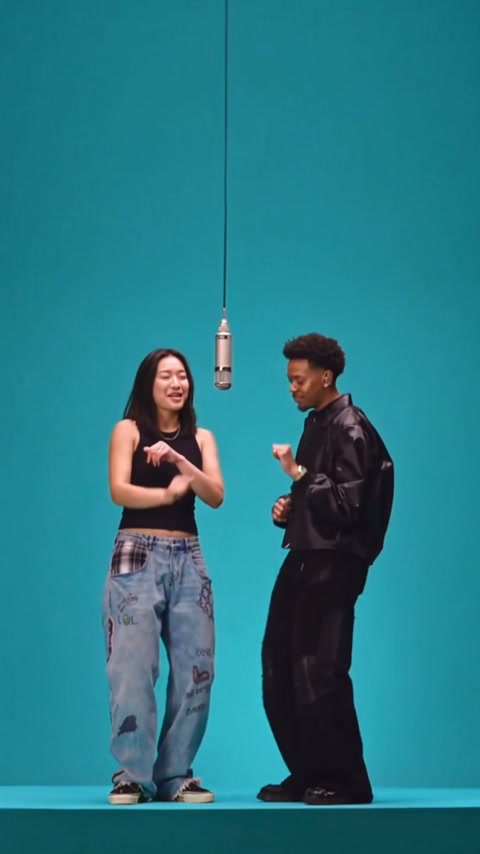
58th Floor AI is a template-based video generator for the November 2026 COLORS teal-studio trend: upload one or two photos and Wan Reference rebuilds a new ~15s 9:16 clip from a hosted Video1 template — hanging mic, hook-to-verse handover, reference sound included. Not CapCut, not face-swapping the COLORS performance, and no prompt to write.
Teal studio template
Hosted COLORS-style teal studio Video1 with sound — Wan rebuilds a new clip from this template. Your photos cast left hook and right verse at the hanging mic.
Your photo(s)
Photo 1 · finishes the hook (left)
Front-facing, sharp eyes — cast as the left role that finishes the hook.
Photo 2 · takes the verse (right)
Second adult cast as the right role that takes the verse toward photo 1.
Quality
Two photos — photo 1 finishes the hook on the left; photo 2 takes the verse on the right. Same photo twice works for a solo joke edit.
~USD uses Max yearly $/credit (best subscription rate). Monthly plans or one-time credit packs cost more per clip.
Template remake preview
Example template remake — Wan follows Video1 motion; your photos star in the teal studio.
Viral templates trending on TikTok and Reels — same one-click formats as AI Effects. Pick another in seconds.
On 30 October 2026, A COLORS SHOW posted Anderson .Paak and Cordae performing “58th Floor” — the opener of Heavy Is the Crown — in a bare teal studio with one hanging mic. Searches for 58th Floor AI spiked in early November as AI template remakes of the hook-to-verse handover took off. On Reeldo, a hosted teal-studio Video1 template plus your photos rebuilds a new vertical clip with sound — not a face-swap of the original COLORS file.
 1
Photo 1 is cast left at the hanging mic and finishes the hook while photo 2 nods beside them.
 2
They turn toward each other — the emotional beat that makes the duo meme work.
 3
Photo 2 takes the verse straight at photo 1 while the camera tightens in.
 4
Flat teal wall and floor, one silver mic on a cable — the look comes from the template, not your bedroom.
As of early November 2026 there is no official 58th Floor CapCut filter. Reeldo is a browser template generator with a fixed hosted Video1 and upfront credits.
One photo solo-casts you for both sides of the mic. Two photos map left hook and right verse separately — clearer for real friends.
Wan generates with reference audio from Video1 — not a silent export. Lyrics are explicit; mute or replace on TikTok if needed.
Left: hosted Video1 motion template Wan follows. Right: real Reeldo template remake from the duo photo tips above — same timing, your photos starring in the teal studio.
Motion and reference audio Reeldo hosts for Wan — teal COLORS studio, hanging mic, hook finish then verse handover.
Template remake on Reeldo with the sample Photo 1 + Photo 2 uploads — ~15s vertical with sound.
Three steps. Template-based — no CapCut filter search and no prompt to write.
One hosted Video1 template copies the viral COLORS timing — wide teal set, hanging mic, hook finish, verse handover. Solo works with one photo; duo uses two.
Face forward, even light. Photo 1 = left / finishes the hook; photo 2 = right / takes the verse. Draft or Standard. The button shows credits before anything runs.
Preview the MP4 with sound, download, and post to TikTok or Reels. The track is explicit — use a clean sound if needed and label AI content when the app asks.
Sharp face, even light, one adult per slot. Role mix-ups (left hook vs right verse) are the most common failure — not the template.


Both use Wan 3.0 at 9:16 with the hosted teal-studio Video1 template (~15s) including reference sound.
Fast test — check likeness and left/right role placement before a sharper render.
15s: ~125 credits @480p · with sound
Default for posting — sharper likeness for TikTok and Reels.
15s: ~282 credits @720p · with sound
People search 58th Floor AI filter and CapCut. This page is a fixed template generator — not a face-swap of the COLORS reel.
Hunt for a filter or write a Seedance prompt, then stitch audio yourself — timing varies and nothing official shipped for this trend.
Template-based: one or two photos, hosted teal-studio Video1 with sound, Wan rebuilds a new clip shot for shot. Credits show before you generate. Not face-swap.
Preview, download, or keep editing in Reeldo: