Reeldo AIReeldo AI

Google Gemini Omni · 1.2 Flash

Gemini Omni 1.2 Flash AI Video Generator

Google Gemini Omni 1.2 Flash on Reeldo — 3–15 second clips with native audio, Draft through 4K, text, image, or up to six reference images (no steering video on 1.2).

3–15 secondsGemini Omni 1.2 FlashUp to 6 reference imagesCredits before Generate

Pick your Omni 1.2 workflow

Use one mode per request — text/refs, single start frame, start+end frames, or video edit on /video-to-video.

Need a steering reference video or Video Extend? Open the Omni 1.1 hub — this page is optimized for 1.2 Flash up to 15s.

More workflows

Create a Gemini Omni 1.2 clip

Credits scale by seconds on 1.2. Omni Reference here is images only (max 6) — add a steering video on /gemini-omni (1.1) or edit an MP4 on /video-to-video.

Describe scene, camera, and native audio — pick 3–15 seconds, then choose a quality tier (Draft–4K).

See Gemini Omni 1.2 examples below

Gemini Omni 1.2

Sound-On

Quality

720p default for social and product clips.

0/5000
16:9 · 5s · 720p

What Gemini Omni 1.2 Flash unlocks

Three product stories — longer clips, image steering, and tiered proofing — illustrated for quick decisions before you spend credits.

Gemini Omni 1.2 Flash fifteen second timeline UI diagram on dark canvas
01

Text to video · 15s

Up to 15 seconds in one sound-on take

What you get
A full vertical ad, UGC line, or product beat without stitching 5s bumps — native dialogue and room tone in a single generation.
On Reeldo
Text to video · Omni Flash · 9:16 · 3–15s integer steps.
Gemini Omni 1.2 six image reference hub node diagram with glowing connectors
02

Omni Reference

Up to six reference images

What you get
Steer SKU, talent, and environment from stills only — each slot maps to one reference image in Omni Reference mode.
On Reeldo
Omni Reference · up to six images · no steering video on 1.2.
Gemini Omni resolution tier ladder Draft Flash Pro 4K infographic
03

Omni Draft · iterate

Draft → Flash → Pro → 4K ladder

What you get
Proof prompts at 360p, then rerun at 720p or 1080p when motion is stable — 4K tier for delivery after approval.
On Reeldo
Pick Omni Draft, Flash, Pro, or 4K in the generator — billed per second.

Built for social & product teams

Four quick reads — audio, frames, cheap proofs, and when to open Omni 1.1.

Native audio in the prompt

Quote dialogue, list SFX, or keep room tone — sound renders with the clip.

Gemini Omni native audio waveform over video frame UI

Start + end frames (≤10s)

Lock opening and closing stills; remove the end frame for up to 15s on one image.

Gemini Omni start and end frame storyboard pair diagram

Draft before Flash

Run 360p proofs from 1 cr/s — then Flash when wording and camera are set.

Gemini Omni Draft 360p iteration preview UI

1.2 vs 1.1 routing

Steering reference video or Video Extend still live on the Omni 1.1 hub.

Gemini Omni 1.2 versus 1.1 decision fork diagram

Gemini Omni 1.2 Flash examples

Two examples — a 15s sound-on vertical ad and a six-image product reel. Settings match Omni 1.2 limits. Prompt templates stay in English for paste-in generation.

Example 01 / 02T2V · Flash · 15s

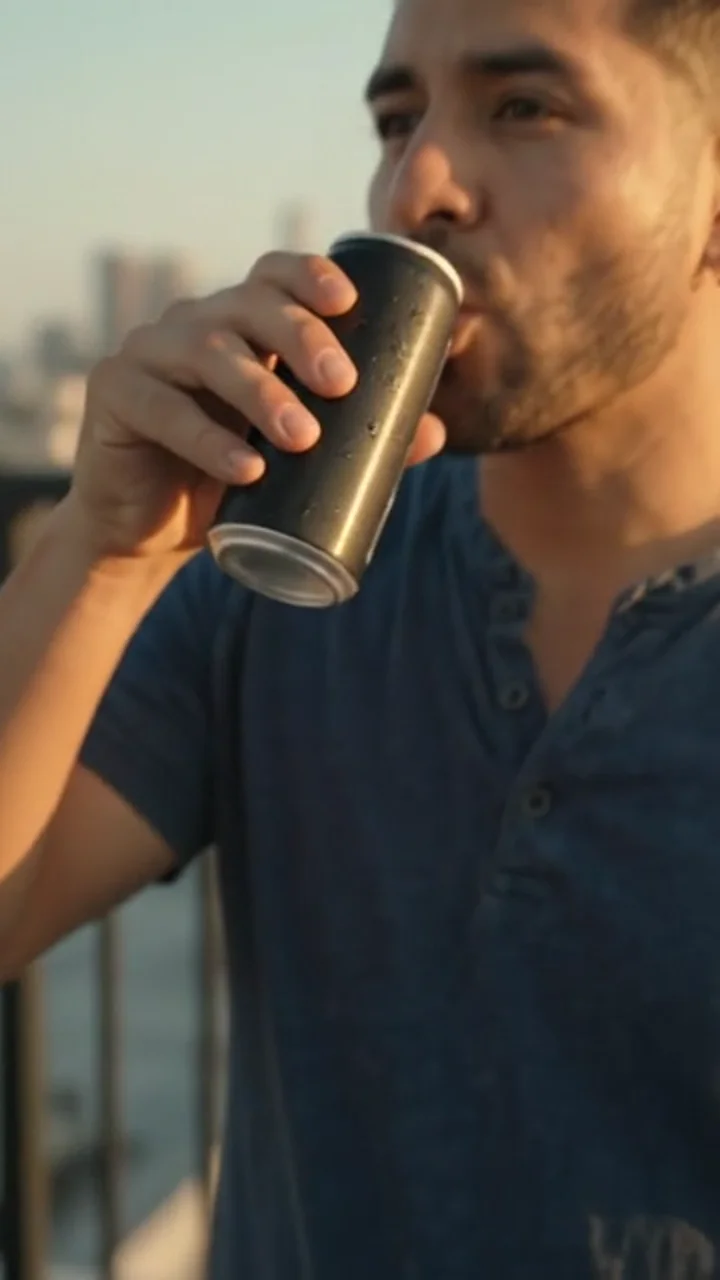
Fifteen-second vertical social ad

Output

Recorded run — prompt and settings match this output.

Scenario
One full 9:16 ad without stitching — the main reason to pick 1.2 over 10s Omni 1.1.
Result
Quoted UGC line plus room tone in a single 15s take.
Settings

Text to video · Omni Flash · 9:16 · 15s

Prompt template

Vertical 9:16, one uninterrupted 15-second take — no cuts, no on-screen text, no readable logos. 0:00–0:04 HOOK: Tight vertical framing on hands pulling the tab on a slim matte black cold-brew can; cold vapor wisps; golden-hour sidelight; shallow depth of field. 0:04–0:11: Smooth handheld ease-out to chest-up, eye level: Latino man, late 20s, faded navy henley, one gold earring, rooftop railing behind him — soft city skyline bokeh at sunset. He cracks the can (sharp carbonation hiss), takes a visible sip, rolls shoulders like he just clocked out, turns to camera with easy confidence. 0:11–0:15: Direct eye contact. He says in a dry, warm baritone: "Strong, cold, not sugary — that's the whole brief." Native audio: dialogue forward and dry; loud can-tab pop and fizz on open; swallow; distant traffic and wind — no music bed, no voiceover reverb. Look: photoreal skin pores and stable face through the turn; cinematic phone-capture energy with subtle handheld; teal-orange sunset grade; premium DTC beverage ad — polished but not broadcast-stiff.

Example 02 / 02Refs · Flash · 12s

Product stills → one reel

Output

References

Café interior reference for Omni Reference

Café

Iced latte product reference for Omni Reference

Latte

Barista portrait style reference for Omni Reference

Talent

Recorded run — prompt and settings match this output.

Scenario
Packaging and talent stills — Omni 1.2 allows up to six reference images, not a steering clip.
Result
One continuous 9:16 clip that keeps SKU colors stable.
Settings

Omni Reference · Omni Flash · 9:16 · 12s · up to 6 images

Prompt template

Using the provided reference images for the café interior, the iced latte product, and the barista portrait style: Vertical 9:16, one continuous 8-second take in that same cozy morning café. Barista (match the friendly talent reference) walks into frame and sets the iced latte on the counter toward camera, natural smile, warm window bokeh behind her. Lighting and wood tones must match the interior reference; glass and drink must match the product reference — no readable logos on cup, apron, or signage. Native audio: soft café murmur, glass clink on counter, faint steam hiss, no music, no on-screen text. Single continuous social reel — not a slideshow or hard cuts between refs.

Gemini Omni 1.2 credits (per second)

A Seconds × tier rate — Omni 1.2 bills per second (Draft/Flash/Pro/4K tiers on Reeldo).

B Image-only Omni Reference on 1.2 — still per-second; no flat per-job rows.

Draft 360p is for prompt iteration. Flash, Pro, and 4K are separate generations — not guaranteed to match Draft frame-for-frame.

6s Draft proof @ 360p

Draft 360p · from $0.17

7 credits

Lock prompt before 12–15s Flash.

12s Flash · 9:16

Flash 720p · from $0.48

20 credits

Matches product ref example.

15s Flash vertical

Flash 720p · from $0.59

25 credits

Longest Omni 1.2 clip on Reeldo.

10s Pro 1080p

Pro 1080p · from $0.59

25 credits

Run after Draft/Flash motion looks right.

Omni Draft vs Flash vs Pro

Omni Draft vs Flash vs Pro
FeatureDraftFlashPro
Resolution360p720p1080p (+ Omni 4K tier)
Credits / sec123 (4K: 4)
6s clip (example)6 credits12 credits18 credits
10s clip @ Flash (example)10 credits @ Draft20 credits~30 credits @ Pro
4K outputNoVia Omni 4K modelVia Omni 4K model
Best forPrompt iteration720p social & multimodal1080p paid-media finals

Yearly plans lower your cost per clip on Reeldo

Yearly billing grants 12× monthly credits at about 10× the monthly price (~2 months free). On Max, yearly is about $0.024/credit vs $0.029 on monthly (~17% lower per credit). One-time packs (Popular) run about $0.045/credit — ~48% higher than Max yearly. ~USD below uses Max yearly; monthly subs or packs increase the dollar amount.

See plans and credit packs →

Draft vs Flash vs Pro vs 4K

Draft 360p
Flash 720p
Pro 1080p
Omni 4K

First+last frame mode caps at 10 seconds. Steering reference video requires Omni 1.1 on /gemini-omni.

~USD uses Max yearly $/credit. Your Generate button shows exact credits before you run.

Gemini Omni 1.2 Flash FAQ

What is Gemini Omni 1.2 Flash on Reeldo?

When does Reeldo use Omni 1.2 vs Omni 1.1?

How long can clips be?

Gemini Omni 1.2 vs Veo 3.1 — which should I use?

Can I upload a reference video on this page?

How are credits calculated on 1.2?

Does Reeldo support Google Flow conversational editing?

Does 1.2 support image to video?

When should I use /gemini-omni instead?

Is Reeldo the official Google Gemini site?

Reeldo is not the official Google website. Generation is single-shot prompts on Reeldo — not Google Flow conversational editing.