
Stop Wasting Credits on Kling 4.0: Cuts, BGM & 30s Fixes
Surprise cuts, unwanted music, or a 30s credit burn? Pick the right tab, fix prompts, and proof at 720p before 1080p on Reeldo.
 Reeldo Team
Kling 4.0 can run 30 seconds, 10 keyframes, and Omni Reference in one pass — but a wrong tab or a first-click 30s roll still costs you. Below: which tab to open, prompt lines that stop cuts and BGM, and a 720p proof → 1080p ship loop on Kling 4.0.
What's going wrong
Wrong tier
“The tutorial showed keyframes — I only get one start frame.”
That is usually Flash. On Reeldo, Full 4.0 is on /kling-4: Keyframes (2–10 stills), Reference, 720p/1080p, up to 30s.
Surprise cuts
“I wanted one take — I got a montage.”
Say single continuous take and how the camera moves (follow, dolly). Proof 5–10s at 720p before you pay for 30s.
Unwanted music
“Dialogue only, but a score appeared anyway.”
Add no music, dialogue-forward, room tone only. Native audio on Full helps lip sync — it still may take a re-roll.
30s on click one
“Two failed 30s runs emptied my credits.”
Treat 30s as final length. Lock motion at 720p · 5–10s, then scale resolution and duration once.
Which tab on /kling-4?
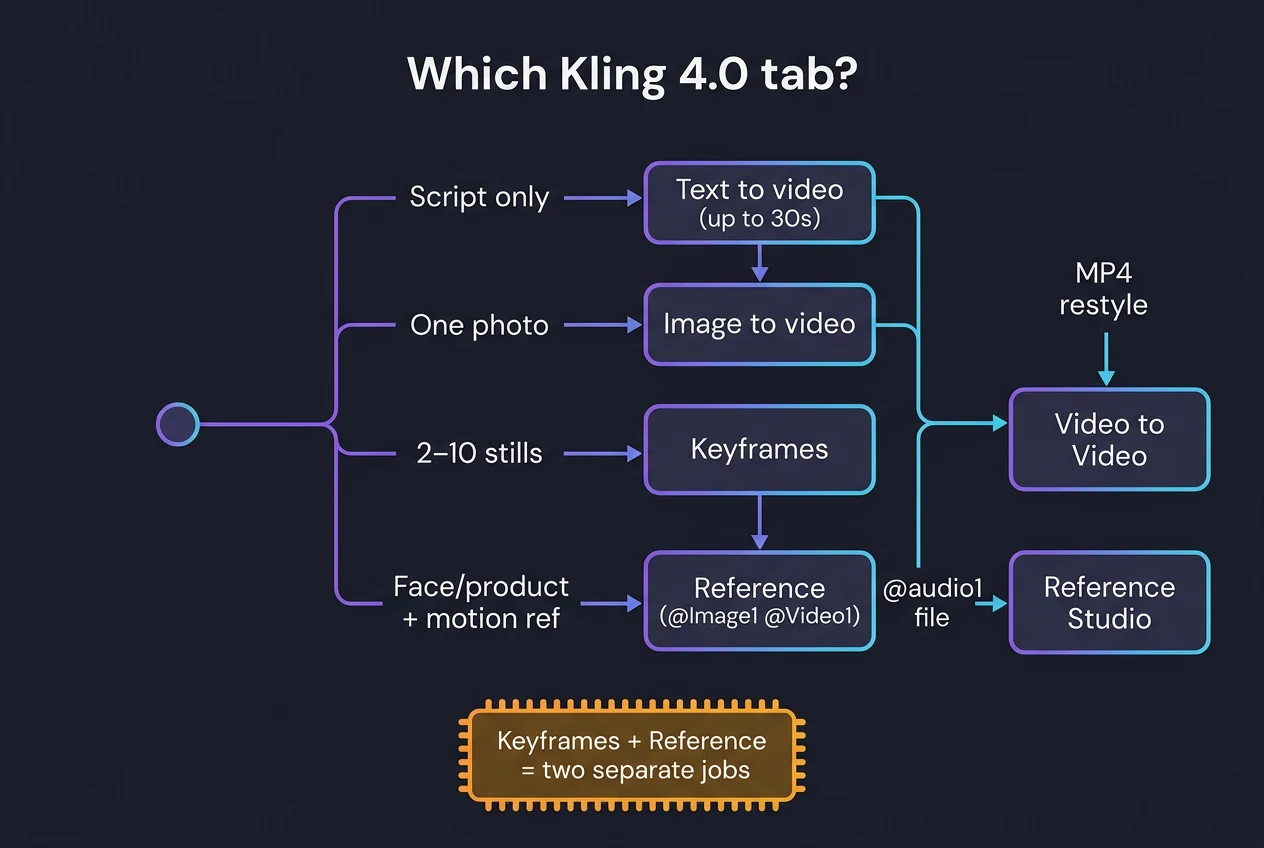
One mode per generation — Keyframes and Reference cannot share the same job.
Script or VO only
- Goal
- Long continuous take, native audio
- Draft
- Text to video · 5–10s 720p proof
- Final
- Scale to 1080p · up to 30s
- Avoid
- 1080p 30s before motion is stable
One hero still
- Goal
- Product or portrait locked — add motion
- Draft
- Image to video tab
- Final
- Same proof → ship pattern
- Avoid
- Wide 720p hero — faces go soft
2–10 storyboard stills
- Goal
- Beats in one clip, not five stitched 5s
- Draft
- Keyframes tab · story order
- Final
- Add mid-frame if motion jumps
- Avoid
- Mixing with Reference in one run
Identity + pacing ref
- Goal
- Same face/product, motion from a clip
- Draft
- Reference · upload then @Image1 @Video1
- Final
- Trim @Video1 to needed beats
- Avoid
- Lowercase @image1 — wrong workspace
Elsewhere on Reeldo: restyle an MP4 → Video to Video. Need an @audio1 file → Reference to Video (Kling 4 uses Element voice_id, not audio uploads).
Full vs Flash (read this before a tutorial)
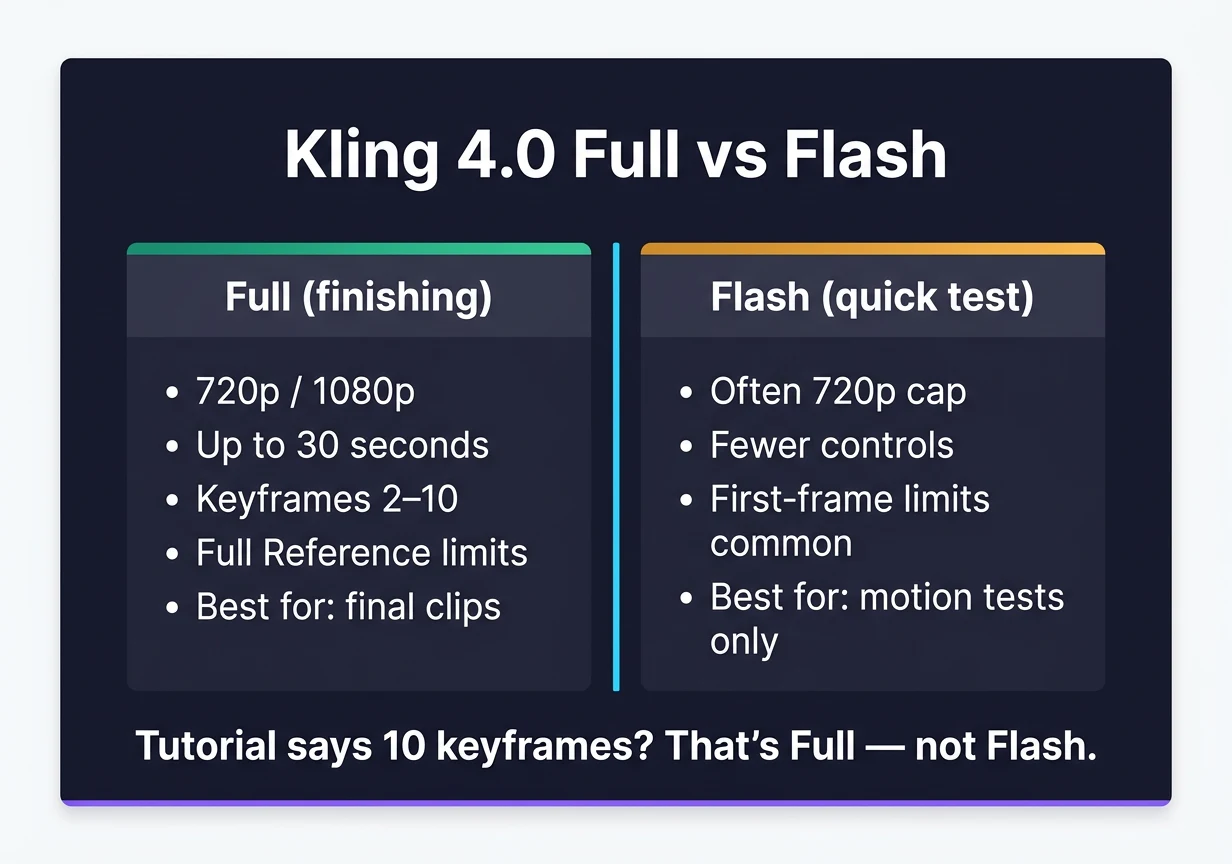
- Full (finishing on Reeldo): 720p/1080p, up to 30s, Keyframes 2–10, full Reference caps, native stereo on Full.
- Flash (quick test): Often 720p, fewer controls; many builds are first-frame only — not ten keyframes.
- Rule of thumb: If the video says “10 keyframes” or “30s 1080p”, assume Full, not Flash.
- Still on Kling 3? Storyboard + Kling 3 for multi-shot; 4.0 when you want one connected clip or heavy Reference.
Picking across Seedance / Kling / Veo → 2026 model comparison.
Three Reference setups (copy the prompt shape)
Upload refs first. Tags on /kling-4 are @Image1, @Video1, @Element1 — not Reference Studio @image1.
Swap product, keep ad pacing
- Goal
- Recreate a reference ad with your SKU
- Draft
- @Video1 pacing · @Image1 packshot
- Final
- Continuous take, no music
- Avoid
- Long @Video1 — bills more seconds
UGC two-shot
- Goal
- Dialogue without extras staring
- Draft
- @Image1 @Image2 · coffee shop
- Final
- No score · background ignores camera
- Avoid
- Only describing speakers — direct the room
Action chain
- Goal
- Cause → effect, not “fight scene”
- Draft
- Handheld follow · 12s · one take
- Final
- Each beat causes the next
- Avoid
- Ending on group hero pose
Product swap — prompt skeleton:
16:9 single continuous take matching @Video1 pacing, no cuts.
Product is @Image1 — label readable. No music — room tone and foley only.
Background people ignore camera.
Keyframes — three-frame unbox:
16:9 one continuous macro dolly. Sealed box → lid open → product hero, logo to camera.
Smooth motion between frames, no hard cuts. No music — tactile sounds only.
Stills shaky? Lock frames in Frame Lab (~$0.09 / image) before video seconds.
Credits: proof, then scale
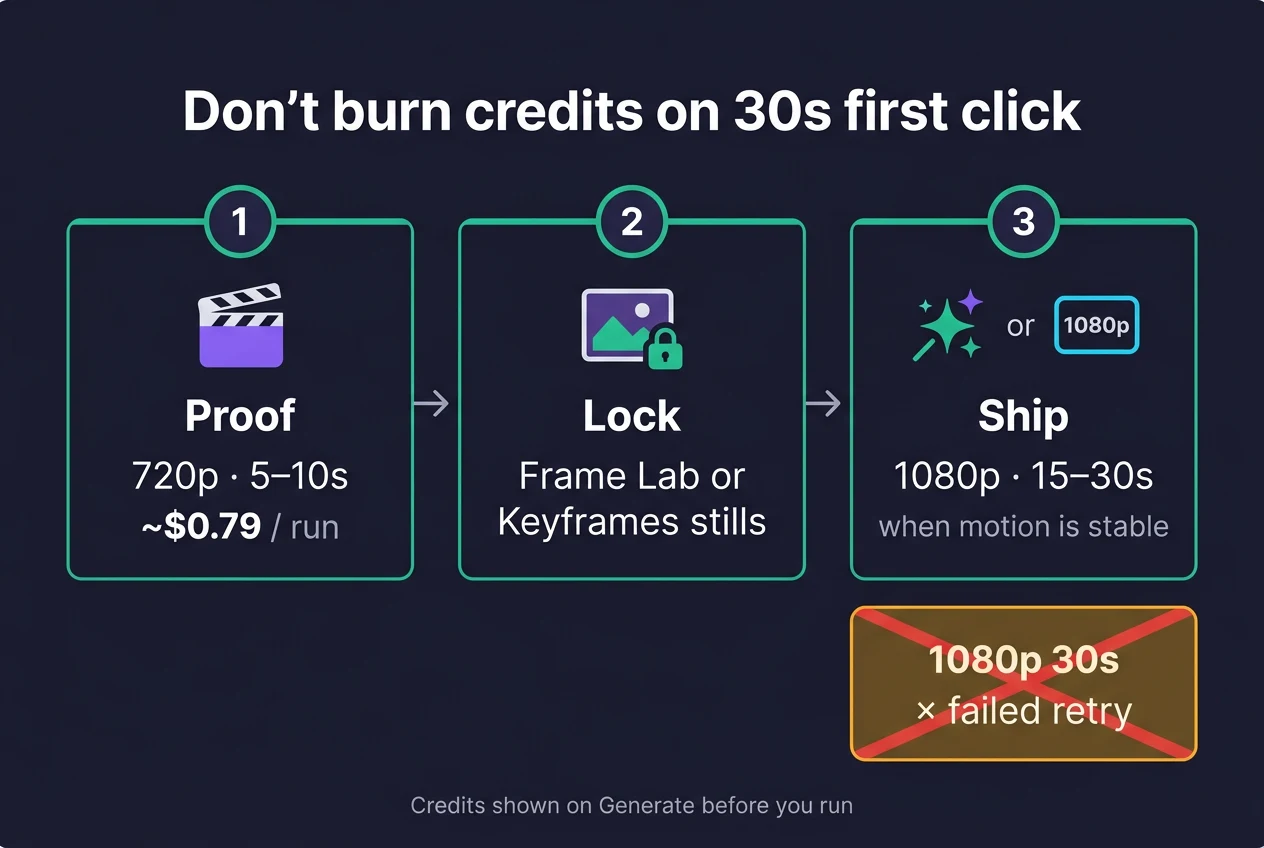
Per-second list pricing (shown on Generate before you run). At ~$0.03/credit, no reference video: ~$0.79 / 5s 720p, ~$2.35 / 10s 1080p, ~$7.05 / 30s 1080p. @Video1 reference can increase billed seconds — upload the shortest clip that carries pacing.
| Stage | What you do | ≈ Cost | Tool |
|---|---|---|---|
| Proof | 720p · 5–10s · motion & tags | ~$0.79–1.57 | Kling 4.0 |
| Lock | Frame Lab or Keyframe stills | ~$0.09 / still | Frame Lab |
| Ship | 1080p · 15–30s when stable | ~$3.50–7.05 | Kling 4.0 |
Smart path
720p 5s ×3 proofs + one 1080p 15s final
~$4.90
~160 credits
Learn motion cheap; pay for length once.
First-click 30s
1080p 30s ×2 failed takes
~$14+
~470+ credits
Two bad 30s rolls beat an entire proof ladder.
Quick fixes
@Image1 failed
“Tag error or ignored ref.”
Upload slots first. @Image1 on /kling-4 — not @image1 on Reference Studio.
Soft wide shot
“Close-up was sharp; pull-back was mush.”
Proof framing at 720p; ship faces at 1080p; avoid huge wide at 720p.
Prompt rejected
“Too long for the API.”
Cap ~2,500 characters on Reeldo — shorten beats or split into two runs.
Expected 4K HDR today
“Marketing mentioned 4K.”
Deliver 1080p here; check kling.ai for HDR/4K rollout. Need 4K hero → Kling 3 4K on Reeldo.
FAQ
Keyframes or Reference?
Keyframes = ordered stills, model fills between. Reference = identity, elements, pacing from @Video1. Two separate jobs if you need both.
How do I get one 30s clip?
Text or Keyframes on /kling-4 → 720p · 5–10s until motion holds → then 1080p and longer duration. One generation can be 30s; a usable 30s often needs several paid proofs.
Is Reeldo kling.ai?
No — independent platform, not affiliated with Kuaishou. Official app is kling.ai; Reeldo shows credits on Generate for Full 4.0 workflows.
Kling 4.0 vs Seedance for talking head?
Seedance 2.5 for many lip-sync finals; Kling 4.0 for long single-take performance + Reference. Route by shot — comparison playbook.
Why did Reference cost more than I expected?
Video refs can bill output × 2 or input + output. Trim @Video1; proof at 720p before 1080p.
Reeldo is not affiliated with Kuaishou or kling.ai. $ estimates: Fal list ~$0.157/s (720p) and ~$0.235/s (1080p) without reference video, ~$0.03/credit Standard. October 2026.