
CapCut Check One Check Two filter
CapCut ships in-app AI filters with their own timing. Reeldo runs in the browser with a fixed hosted reference and upfront credits.
October 2026 UK trend · 1–2 photos · ~9s · 9:16 · with sound
Upload one or two clear portraits, pick the night-crowd reference, and generate a vertical mic-check clip that follows Video1 motion and audio. Draft 480p or Standard 720p — credits show on Create before you run.
Check One Check Two AI is the October 2026 UK grime mic-check meme: upload one or two photos and generate a vertical clip that copies a night-crowd reference — camera swing, “check one, check two” lip-sync, and pointing at the lens — with the reference sound baked in. Reeldo uses Wan 3.0 with hosted Video1; no CapCut template and no prompt.
Reference clip
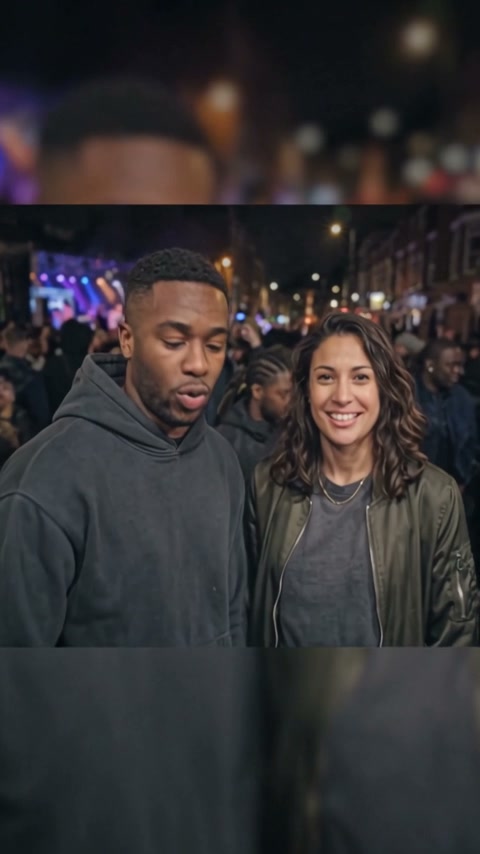
Hosted night-crowd mic-check motion with reference sound — Wan follows Video1 shot for shot. Your photo(s) replace the rapper and friend.
Your photo(s)
Photo 1 · rapper close-up
Front-facing, sharp eyes — this face raps into the lens after the camera swing.
Photo 2 · friend at shoulder
Second adult for the opening side-by-side crowd shot and over-the-shoulder nods.
Quality
Upload both photos before generating — Photo 1 (survivor) and Photo 2 (who turns).
~USD uses Max yearly $/credit (best subscription rate). Monthly plans or one-time credit packs cost more per clip.
Reference preview
Motion and audio Wan copies from Video1 — your face(s) swap in.
Viral templates trending on TikTok and Reels — same one-click formats as AI Effects. Pick another in seconds.
In October 2026, UK grime and TikTok feeds surged with AI versions of the “check one, check two” mic-check — a friend at your shoulder, a sudden swing into your face, and lip-sync to the reference track. Searches for check one check two ai, check one check two capcut, and check one check two ai filter spiked. Reeldo copies a hosted night-crowd reference with sound on Video1.
 1
1The clip often starts wide in a night crowd — two people side by side before the camera rushes in.
 2
2A handheld push swings from the crowd into an extreme close-up — that snap is half the meme.
 3
3The rapper lip-syncs the mic-check lines on beat — eyebrows up, head nods, mouth sharp on the reference audio.
 4
4Most edits finish by pointing at the camera — your uploaded face sells the joke.
CapCut ships in-app AI filters with their own timing. Reeldo runs in the browser with a fixed hosted reference and upfront credits.
One photo solo-clones you for the opening duo beat. Two photos map rapper and friend separately — clearer for real pairs.
Wan generates with reference audio from Video1 — not a silent export you must fix in TikTok “add sound.”
Left: hosted motion reference Wan follows as Video1. Right: real Reeldo output from the duo photo example above — same timing with your faces swapped in.
Motion and reference audio Reeldo hosts for Wan — crowd open, camera swing, mic-check lip-sync.
Generated on Reeldo with the sample rapper + friend uploads — ~9s vertical with sound.
Three steps. No CapCut filter search and no prompt to write.
One hosted clip copies the viral mic-check timing — crowd open, camera swing, close-up rap. Solo works with one photo; duo uses two.
Face forward, even light. Draft or Standard. The button shows credits before anything runs.
Preview the MP4 with sound, download, and post to TikTok or Reels. Label AI content when the app asks.
Sharp face, even light, one adult per slot. The close-up needs readable eyes and mouth for lip-sync.


Both use Wan 3.0 at 9:16 with hosted Video1 (~9s) including reference sound.
Fast test — check face match and lip-sync timing before a sharper render.
9s: ~38 credits @480p · with sound
Default for posting — sharper face for TikTok and Reels.
9s: ~85 credits @720p · with sound
Third-party sites list Check One Check Two AI filters. This page is the Reeldo browser flow with a fixed reference clip.
Search the filter, drop a photo, export inside the app — timing varies by template.
One or two photos, hosted night-crowd Video1 with sound, Wan copies motion shot for shot. Credits show before you generate.
Preview, download, or keep editing in Reeldo: